
这里基于微服务’ralab-nlp’和’ralab-client’
- Add the Maven spring-cloud-starter-netflix-eureka-client denpendency
- Add @EnableEurekaClient to the application class
- Add spring.application.name parameter to the application.properties file
这时修改服务提供者ralab-nlp的pom.xml文件,引入eureka-client依赖
1 | <?xml version="1.0" encoding="UTF-8"?> |
修改RalabNlpApplication文件1
2
3
4
5
6
7
8
9
10
11
12
13
14
15
16
17
18package com.ralab.ralabnlp;
import org.springframework.boot.SpringApplication;
import org.springframework.boot.autoconfigure.SpringBootApplication;
import org.springframework.cloud.netflix.eureka.EnableEurekaClient;
import org.springframework.context.annotation.ComponentScan;
//(scanBasePackages = { "com.ralab.nlp.controller"})
//@ComponentScan({"com.ralab.nlp.controller"})
public class RalabNlpApplication {
public static void main(String[] args) {
SpringApplication.run(RalabNlpApplication.class, args);
}
}
修改application.properties文件
spring.application.name=nlp-service
server.port=8090
运行RalabNlpApplication
同时修改服务消费者ralab-client的pom.xml文件,引入eureka-client依赖1
2
3
4
5
6
7
8
9
10
11
12
13
14
15
16
17
18
19
20
21
22
23
24
25
26
27
28
29
30
31
32
33
34
35
36
37
38
39
40
41
42
43
44
45
46
47
48
49
50
51
52
53
54
55
56
57
58
59
60<?xml version="1.0" encoding="UTF-8"?>
<project xmlns="http://maven.apache.org/POM/4.0.0" xmlns:xsi="http://www.w3.org/2001/XMLSchema-instance"
xsi:schemaLocation="http://maven.apache.org/POM/4.0.0 https://maven.apache.org/xsd/maven-4.0.0.xsd">
<modelVersion>4.0.0</modelVersion>
<parent>
<groupId>org.springframework.boot</groupId>
<artifactId>spring-boot-starter-parent</artifactId>
<version>2.1.8.RELEASE</version>
<relativePath/> <!-- lookup parent from repository -->
</parent>
<groupId>com.ralab</groupId>
<artifactId>ralab-client</artifactId>
<version>0.0.1-SNAPSHOT</version>
<name>ralab-client</name>
<description>Demo project for Spring Boot</description>
<properties>
<java.version>1.8</java.version>
<spring-cloud.version>Greenwich.SR2</spring-cloud.version>
</properties>
<dependencies>
<dependency>
<groupId>org.springframework.boot</groupId>
<artifactId>spring-boot-starter-web</artifactId>
</dependency>
<dependency>
<groupId>org.springframework.cloud</groupId>
<artifactId>spring-cloud-starter-netflix-eureka-client</artifactId>
</dependency>
<dependency>
<groupId>org.springframework.boot</groupId>
<artifactId>spring-boot-starter-test</artifactId>
<scope>test</scope>
</dependency>
</dependencies>
<dependencyManagement>
<dependencies>
<dependency>
<groupId>org.springframework.cloud</groupId>
<artifactId>spring-cloud-dependencies</artifactId>
<version>${spring-cloud.version}</version>
<type>pom</type>
<scope>import</scope>
</dependency>
</dependencies>
</dependencyManagement>
<build>
<plugins>
<plugin>
<groupId>org.springframework.boot</groupId>
<artifactId>spring-boot-maven-plugin</artifactId>
</plugin>
</plugins>
</build>
</project>
修改RalabClientApplication文件1
2
3
4
5
6
7
8
9
10
11
12
13
14
15
16
17
18
19
20
21
22
23package com.ralab.ralabclient;
import org.springframework.boot.SpringApplication;
import org.springframework.boot.autoconfigure.SpringBootApplication;
import org.springframework.cloud.netflix.eureka.EnableEurekaClient;
import org.springframework.context.annotation.Bean;
import org.springframework.web.client.RestTemplate;
public class RalabClientApplication {
public RestTemplate getRestTemplate()
{
return new RestTemplate();
}
public static void main(String[] args) {
SpringApplication.run(RalabClientApplication.class, args);
}
}
修改application.properties文件
spring.application.name=nlp-client
server.port=8091
运行RalabClientApplication
这时在浏览器打开http://localhost:8761/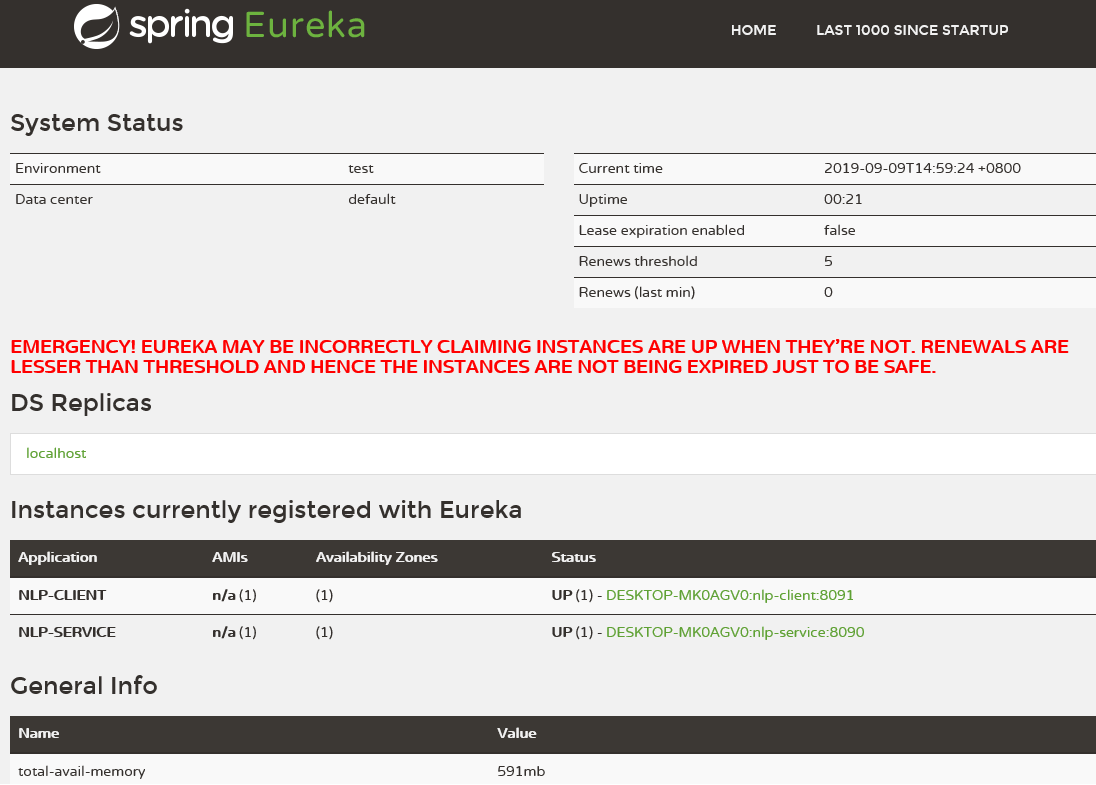
可以看到注册实例nlp-service和nlp-client