在spring cloud建构的微服务架构中,多个微服务有时需要统一配置信息,这时我们可以建立配置服务器ralab-configserver,然后各微服务从该配置服务器获取配置信息

ralab-configserver服务器

  • New microservice ‘ralab-configserver’ and add the Maven spring-cloud-config-server denpendency
  • Add @EnableConfigServer to the application class
  • Add github repository url to application.yml file

配置服务器的pom.xml文件如下:

1
2
3
4
5
6
7
8
9
10
11
12
13
14
15
16
17
18
19
20
21
22
23
24
25
26
27
28
29
30
31
32
33
34
35
36
37
38
39
40
41
42
43
44
45
46
47
48
49
50
51
52
53
54
55
56
<?xml version="1.0" encoding="UTF-8"?>
<project xmlns="http://maven.apache.org/POM/4.0.0" xmlns:xsi="http://www.w3.org/2001/XMLSchema-instance"
xsi:schemaLocation="http://maven.apache.org/POM/4.0.0 https://maven.apache.org/xsd/maven-4.0.0.xsd">
<modelVersion>4.0.0</modelVersion>
<parent>
<groupId>org.springframework.boot</groupId>
<artifactId>spring-boot-starter-parent</artifactId>
<version>2.1.8.RELEASE</version>
<relativePath/> <!-- lookup parent from repository -->
</parent>
<groupId>com.ralab</groupId>
<artifactId>ralab-configserver</artifactId>
<version>0.0.1-SNAPSHOT</version>
<name>ralab-configserver</name>
<description>Demo project for Spring Boot</description>

<properties>
<java.version>1.8</java.version>
<spring-cloud.version>Greenwich.SR3</spring-cloud.version>
</properties>

<dependencies>
<dependency>
<groupId>org.springframework.cloud</groupId>
<artifactId>spring-cloud-config-server</artifactId>
</dependency>

<dependency>
<groupId>org.springframework.boot</groupId>
<artifactId>spring-boot-starter-test</artifactId>
<scope>test</scope>
</dependency>
</dependencies>

<dependencyManagement>
<dependencies>
<dependency>
<groupId>org.springframework.cloud</groupId>
<artifactId>spring-cloud-dependencies</artifactId>
<version>${spring-cloud.version}</version>
<type>pom</type>
<scope>import</scope>
</dependency>
</dependencies>
</dependencyManagement>

<build>
<plugins>
<plugin>
<groupId>org.springframework.boot</groupId>
<artifactId>spring-boot-maven-plugin</artifactId>
</plugin>
</plugins>
</build>

</project>

RalabConfigserverApplication文件

1
2
3
4
5
6
7
8
9
10
11
12
13
14
15
package com.ralab.ralabconfigserver;

import org.springframework.boot.SpringApplication;
import org.springframework.boot.autoconfigure.SpringBootApplication;
import org.springframework.cloud.config.server.EnableConfigServer;

@SpringBootApplication
@EnableConfigServer
public class RalabConfigserverApplication {

public static void main(String[] args) {
SpringApplication.run(RalabConfigserverApplication.class, args);
}

}

bootstrap.yml

1
2
3
spring:
application:
name: configserver

application.yml

1
2
3
4
5
6
7
8
9
10
server:
port: 8888
spring:
cloud:
config:
server:
encrypt.enabled: false
git:
uri: https://github.com/chenying99/config-repo
searchPaths: licensingservice,organizationservice

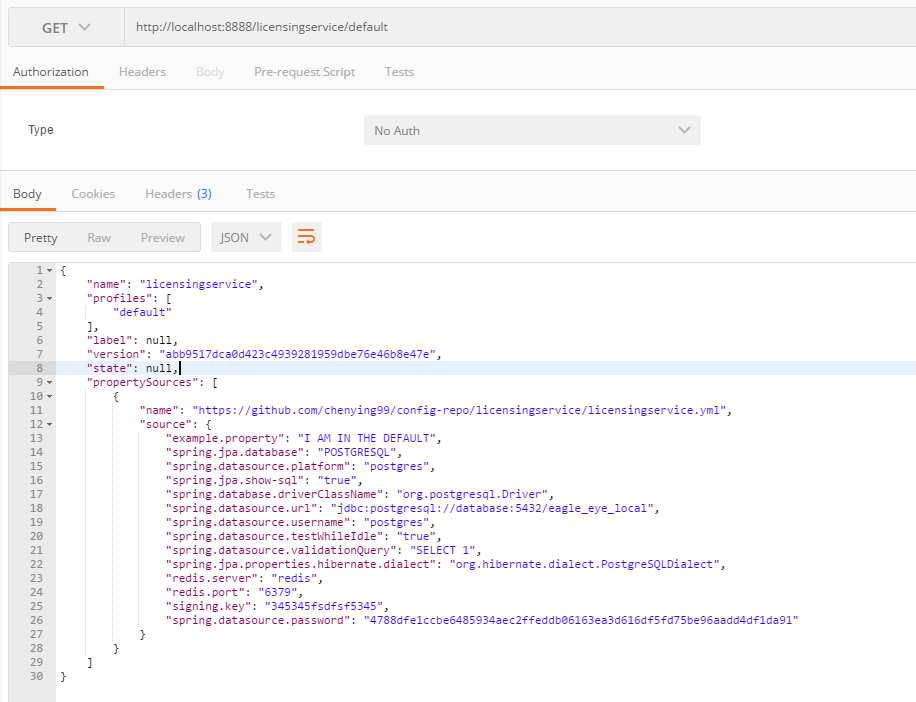
运行RalabConfigserverApplication,然后打开http://localhost:8888/licensingservice/default
前面的文章,我们利用RestTemplate对象和feign组件实现了微服务之间的通信,并且通过集成Hystrix,从而实现了容错及故障恢复功能

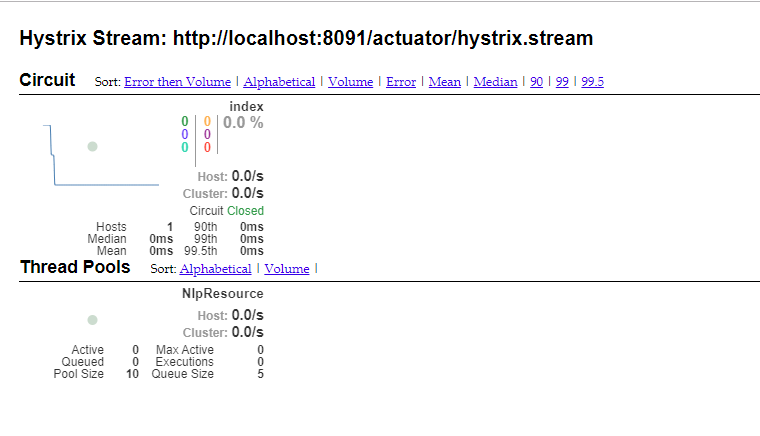
本文主要实现对Hystrix的可视化监控

这里新建微服务’ralab-hystrix-dashboard’

  • New microsevice ralab-hystrix-dashboard and add the Maven spring-cloud-starter-netflix-hystrix-dashboard denpendency
  • Add @EnableHystrixDashboard to the application class
  • Config info to application.yml file

同时被监控的微服务

  • Add spring-boot-starter-actuator denpendency
  • Add management.endpoints.web.exposure.include=hystrix.stream parameter to the application file

微服务’ralab-hystrix-dashboard’pom.xml文件如下:

1
2
3
4
5
6
7
8
9
10
11
12
13
14
15
16
17
18
19
20
21
22
23
24
25
26
27
28
29
30
31
32
33
34
35
36
37
38
39
40
41
42
43
44
45
46
47
48
49
50
51
52
53
54
55
56
<?xml version="1.0" encoding="UTF-8"?>
<project xmlns="http://maven.apache.org/POM/4.0.0" xmlns:xsi="http://www.w3.org/2001/XMLSchema-instance"
xsi:schemaLocation="http://maven.apache.org/POM/4.0.0 https://maven.apache.org/xsd/maven-4.0.0.xsd">
<modelVersion>4.0.0</modelVersion>
<parent>
<groupId>org.springframework.boot</groupId>
<artifactId>spring-boot-starter-parent</artifactId>
<version>2.1.8.RELEASE</version>
<relativePath/> <!-- lookup parent from repository -->
</parent>
<groupId>com.ralab</groupId>
<artifactId>ralab-hystrix-dashboard</artifactId>
<version>0.0.1-SNAPSHOT</version>
<name>ralab-hystrix-dashboard</name>
<description>Demo project for Spring Boot</description>

<properties>
<java.version>1.8</java.version>
<spring-cloud.version>Greenwich.SR3</spring-cloud.version>
</properties>

<dependencies>
<dependency>
<groupId>org.springframework.cloud</groupId>
<artifactId>spring-cloud-starter-netflix-hystrix-dashboard</artifactId>
</dependency>

<dependency>
<groupId>org.springframework.boot</groupId>
<artifactId>spring-boot-starter-test</artifactId>
<scope>test</scope>
</dependency>
</dependencies>

<dependencyManagement>
<dependencies>
<dependency>
<groupId>org.springframework.cloud</groupId>
<artifactId>spring-cloud-dependencies</artifactId>
<version>${spring-cloud.version}</version>
<type>pom</type>
<scope>import</scope>
</dependency>
</dependencies>
</dependencyManagement>

<build>
<plugins>
<plugin>
<groupId>org.springframework.boot</groupId>
<artifactId>spring-boot-maven-plugin</artifactId>
</plugin>
</plugins>
</build>

</project>

RalabHystrixDashboardApplication文件

1
2
3
4
5
6
7
8
9
10
11
12
13
14
15
package com.ralab.ralabhystrixdashboard;

import org.springframework.boot.SpringApplication;
import org.springframework.boot.autoconfigure.SpringBootApplication;
import org.springframework.cloud.netflix.hystrix.dashboard.EnableHystrixDashboard;

@SpringBootApplication
@EnableHystrixDashboard
public class RalabHystrixDashboardApplication {

public static void main(String[] args) {
SpringApplication.run(RalabHystrixDashboardApplication.class, args);
}

}

application.yml文件

1
2
3
4
5
spring:
application:
name: hystrix-dashboard
server:
port: 8080

运行RalabHystrixDashboardApplication,打开http://localhost:8080/hystrix

同时被监控的微服务加入依赖

1
2
3
4
<dependency>
<groupId>org.springframework.boot</groupId>
<artifactId>spring-boot-starter-actuator</artifactId>
</dependency>

曝露hystrix端点

1
2
3
spring.application.name=nlp-client
server.port=8091
management.endpoints.web.exposure.include=hystrix.stream

这时在输入框输入’http://localhost:8091/actuator/hystrix.stream',点击Monitor stream按钮,就可以看到如下页面了

注:spring cloud还提供了turbine组件对多个微服务的Hystrix信息进行聚合,从而实现对微服务cluster的Hystrix信息的可视化监控

上文我们采用feign组件与微服务’ralab-nlp’进行通信,在实际应用中,feign组件通过集成Hystrix,从而实现熔断机制
改造微服务’ralab-client’

  • Add the Maven spring-cloud-starter-netflix-hystrix denpendency
  • Config hystrix info to bootstrap.yml file
  • Add FeignClient fallback class by Implement EurekaFeignService Interface
    我们在前面的文章中已经添加了spring-cloud-starter-netflix-hystrix依赖
    1
    2
    3
    4
    <dependency>
    <groupId>org.springframework.cloud</groupId>
    <artifactId>spring-cloud-starter-netflix-hystrix</artifactId>
    </dependency>

bootstrap.yml

1
2
3
4
5
6
7
8
9
10
11
12
13
14
15
16
17
18
19
20
21
22
23
24
25
26
27
28
29
30
31
eureka:
instance:
# ip-address: 127.0.0.1
prefer-ip-address: true # 补充
client:
serviceUrl:
defaultZone: http://localhost:8761/eureka/

server:
port: 8091
management:
endpoints:
web:
exposure:
include: hystrix.stream

spring:
application:
name: nlp-client
cloud:
config:
name: licensingservice
profile: default
label: master
discovery:
enabled: true
service-id: configserver

feign:
hystrix:
enabled: true

EurekaFeignService文件

1
2
3
4
5
6
7
8
9
10
11
12
13
14
15
16
17
18
19
20
package com.ralab.ralabclient.services;

import org.springframework.cloud.openfeign.FeignClient;
import org.springframework.stereotype.Component;
import org.springframework.web.bind.annotation.RequestMapping;

@FeignClient(value = "nlp-service",fallback = EurekaFeignServiceFailure.class)
public interface EurekaFeignService {

@RequestMapping(value = "nlp/api")
String nlpService();
}

@Component
class EurekaFeignServiceFailure implements EurekaFeignService {
@Override
public String nlpService() {
return "不好意思,feingn调用失败";
}
}

NlpResource文件 注释@HystrixCommand注解

1
2
3
4
5
6
7
8
9
10
11
12
13
14
15
16
17
18
19
20
21
22
23
24
25
26
27
28
29
30
31
32
33
34
35
36
37
38
39
40
41
42
43
44
45
46
47
48
49
50
51
52
53
54
55
56
package com.ralab.ralabclient.resources;

import com.netflix.hystrix.contrib.javanica.annotation.HystrixCommand;
import com.ralab.ralabclient.services.EurekaFeignService;
import org.springframework.beans.factory.annotation.Autowired;
import org.springframework.beans.factory.annotation.Value;
import org.springframework.cloud.context.config.annotation.RefreshScope;
import org.springframework.web.bind.annotation.GetMapping;
import org.springframework.web.bind.annotation.RequestMapping;
import org.springframework.web.bind.annotation.RestController;
import org.springframework.web.client.RestTemplate;

@RestController
@RequestMapping("/nlp")
@RefreshScope
public class NlpResource {

@Autowired
private RestTemplate restTemplate;

@Autowired
private EurekaFeignService eurekaFeignService;

@Value("${example.property}")
private String exampleProperty;

@RequestMapping("/config")
public String home() {
return "exampleProperty:" + exampleProperty;
}

@GetMapping("/service")
@HystrixCommand(fallbackMethod = "getFallbackIndex")
public String index()
{
//String result = restTemplate.getForObject("http://localhost:8090/nlp/api", String.class);
String result = restTemplate.getForObject("http://nlp-service/nlp/api", String.class);
return result;
}

@GetMapping("/feign")
//@HystrixCommand(fallbackMethod = "getFallbackIndex")
public String feignservice()
{
//String result = restTemplate.getForObject("http://localhost:8090/nlp/api", String.class);
String result = eurekaFeignService.nlpService();
return result;
}

private String getFallbackIndex()
{
//String result = restTemplate.getForObject("http://localhost:8090/nlp/api", String.class);

return "不好意思,没有获取到服务端信息";
}
}

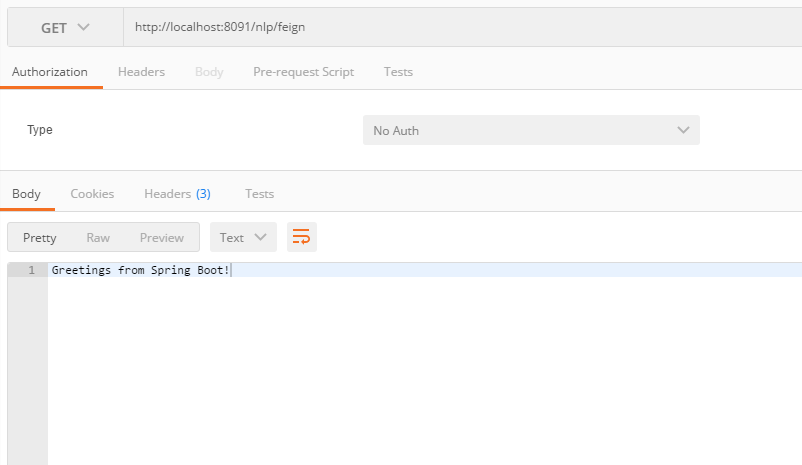
这时停止微服务’ralab-nlp’,打开http://localhost:8091/nlp/feign

在实际应用中,spring cloud通常feign组件与服务提供者进行通信,feign有着更友好的api调用方式
我们改造微服务’ralab-client’

  • Add the Maven spring-cloud-config-server denpendency
  • Add @EnableFeignClients to the application class
  • Add FeignClient Interface communicate to microservice ‘ralab-nlp’
  • Add invoke Interface to RestController NlpResource
    1
    2
    3
    4
    5
    6
    7
    8
    9
    10
    11
    12
    13
    14
    15
    16
    17
    18
    19
    20
    21
    22
    23
    24
    25
    26
    27
    28
    29
    30
    31
    32
    33
    34
    35
    36
    37
    38
    39
    40
    41
    42
    43
    44
    45
    46
    47
    48
    49
    50
    51
    52
    53
    54
    55
    56
    57
    58
    59
    60
    61
    62
    63
    64
    65
    66
    67
    68
    69
    70
    71
    72
    73
    74
    75
    76
    77
    78
    79
    80
    <?xml version="1.0" encoding="UTF-8"?>
    <project xmlns="http://maven.apache.org/POM/4.0.0" xmlns:xsi="http://www.w3.org/2001/XMLSchema-instance"
    xsi:schemaLocation="http://maven.apache.org/POM/4.0.0 https://maven.apache.org/xsd/maven-4.0.0.xsd">
    <modelVersion>4.0.0</modelVersion>
    <parent>
    <groupId>org.springframework.boot</groupId>
    <artifactId>spring-boot-starter-parent</artifactId>
    <version>2.1.8.RELEASE</version>
    <relativePath/> <!-- lookup parent from repository -->
    </parent>
    <groupId>com.ralab</groupId>
    <artifactId>ralab-client</artifactId>
    <version>0.0.1-SNAPSHOT</version>
    <name>ralab-client</name>
    <description>Demo project for Spring Boot</description>

    <properties>
    <java.version>1.8</java.version>
    <spring-cloud.version>Greenwich.SR3</spring-cloud.version>
    </properties>

    <dependencies>
    <dependency>
    <groupId>org.springframework.boot</groupId>
    <artifactId>spring-boot-starter-web</artifactId>
    </dependency>
    <dependency>
    <groupId>org.springframework.cloud</groupId>
    <artifactId>spring-cloud-starter-netflix-eureka-client</artifactId>
    </dependency>

    <dependency>
    <groupId>org.springframework.cloud</groupId>
    <artifactId>spring-cloud-starter-openfeign</artifactId>
    </dependency>

    <dependency>
    <groupId>org.springframework.cloud</groupId>
    <artifactId>spring-cloud-starter-netflix-hystrix</artifactId>
    </dependency>

    <dependency>
    <groupId>org.springframework.boot</groupId>
    <artifactId>spring-boot-starter-actuator</artifactId>
    </dependency>
    <!--添加依赖,获取配置服务器的相关配置信息-->
    <dependency>
    <groupId>org.springframework.cloud</groupId>
    <artifactId>spring-cloud-starter-config</artifactId>
    </dependency>

    <dependency>
    <groupId>org.springframework.boot</groupId>
    <artifactId>spring-boot-starter-test</artifactId>
    <scope>test</scope>
    </dependency>
    </dependencies>

    <dependencyManagement>
    <dependencies>
    <dependency>
    <groupId>org.springframework.cloud</groupId>
    <artifactId>spring-cloud-dependencies</artifactId>
    <version>${spring-cloud.version}</version>
    <type>pom</type>
    <scope>import</scope>
    </dependency>
    </dependencies>
    </dependencyManagement>

    <build>
    <plugins>
    <plugin>
    <groupId>org.springframework.boot</groupId>
    <artifactId>spring-boot-maven-plugin</artifactId>
    </plugin>
    </plugins>
    </build>

    </project>

RalabClientApplication文件

1
2
3
4
5
6
7
8
9
10
11
12
13
14
15
16
17
18
19
20
21
22
23
24
25
26
27
28
29
30
package com.ralab.ralabclient;

import org.springframework.boot.SpringApplication;
import org.springframework.boot.autoconfigure.SpringBootApplication;
import org.springframework.cloud.client.circuitbreaker.EnableCircuitBreaker;
import org.springframework.cloud.client.loadbalancer.LoadBalanced;
import org.springframework.cloud.context.config.annotation.RefreshScope;
import org.springframework.cloud.netflix.eureka.EnableEurekaClient;
import org.springframework.cloud.openfeign.EnableFeignClients;
import org.springframework.context.annotation.Bean;
import org.springframework.web.client.RestTemplate;

@SpringBootApplication
@EnableEurekaClient
@EnableCircuitBreaker
@EnableFeignClients
public class RalabClientApplication {

@Bean
@LoadBalanced
public RestTemplate getRestTemplate()
{
return new RestTemplate();
}

public static void main(String[] args) {
SpringApplication.run(RalabClientApplication.class, args);
}

}

EurekaFeignService文件

1
2
3
4
5
6
7
8
9
10
11
12
package com.ralab.ralabclient.services;

import org.springframework.cloud.openfeign.FeignClient;
import org.springframework.stereotype.Component;
import org.springframework.web.bind.annotation.RequestMapping;

@FeignClient(value = "nlp-service")
public interface EurekaFeignService {

@RequestMapping(value = "nlp/api")
String nlpService();
}

然后在NlpResource调用上面的feign接口

1
2
3
4
5
6
7
8
9
10
11
12
13
14
15
16
17
18
19
20
21
22
23
24
25
26
27
28
29
30
31
32
33
34
35
36
37
38
39
40
41
42
43
44
45
46
47
48
49
50
51
52
53
54
55
package com.ralab.ralabclient.resources;

import com.netflix.hystrix.contrib.javanica.annotation.HystrixCommand;
import com.ralab.ralabclient.services.EurekaFeignService;
import org.springframework.beans.factory.annotation.Autowired;
import org.springframework.beans.factory.annotation.Value;
import org.springframework.cloud.context.config.annotation.RefreshScope;
import org.springframework.web.bind.annotation.GetMapping;
import org.springframework.web.bind.annotation.RequestMapping;
import org.springframework.web.bind.annotation.RestController;
import org.springframework.web.client.RestTemplate;

@RestController
@RequestMapping("/nlp")
@RefreshScope
public class NlpResource {

@Autowired
private RestTemplate restTemplate;

@Autowired
private EurekaFeignService eurekaFeignService;

@Value("${example.property}")
private String exampleProperty;

@RequestMapping("/config")
public String home() {
return "exampleProperty:" + exampleProperty;
}

@GetMapping("/service")
@HystrixCommand(fallbackMethod = "getFallbackIndex")
public String index()
{
//String result = restTemplate.getForObject("http://localhost:8090/nlp/api", String.class);
String result = restTemplate.getForObject("http://nlp-service/nlp/api", String.class);
return result;
}

@GetMapping("/feign")
@HystrixCommand(fallbackMethod = "getFallbackIndex")
public String feignservice()
{
String result = eurekaFeignService.nlpService();
return result;
}

private String getFallbackIndex()
{
//String result = restTemplate.getForObject("http://localhost:8090/nlp/api", String.class);

return "不好意思,没有获取到服务端信息";
}
}

运行RalabClientApplication,打开http://localhost:8091/nlp/feign

前面的文章主要探索的是微服务通信及服务发现(Communication and Discovery),接下来要解决的是容错及故障恢复(Fault Tolerance and Resilience)
当某个微服务出现故障时,确保系统能够正常运行及从故障中恢复
spring cloud采用了一种称之为断路器(Circuit breaker)的模式,本文主要演示该模式的Hystrix实现

这里是基于微服务’ralab-client’

  • Add the Maven spring-cloud-starter-netflix-hystrix denpendency
  • Add @EnableCircuitBreaker to the application class
  • Add @HystrixCommand to methods that need circuit breakers
  • configure Hystrix behavior
    其pom.xml文件如下:
    1
    2
    3
    4
    5
    6
    7
    8
    9
    10
    11
    12
    13
    14
    15
    16
    17
    18
    19
    20
    21
    22
    23
    24
    25
    26
    27
    28
    29
    30
    31
    32
    33
    34
    35
    36
    37
    38
    39
    40
    41
    42
    43
    44
    45
    46
    47
    48
    49
    50
    51
    52
    53
    54
    55
    56
    57
    58
    59
    60
    61
    62
    63
    64
    65
    <?xml version="1.0" encoding="UTF-8"?>
    <project xmlns="http://maven.apache.org/POM/4.0.0" xmlns:xsi="http://www.w3.org/2001/XMLSchema-instance"
    xsi:schemaLocation="http://maven.apache.org/POM/4.0.0 https://maven.apache.org/xsd/maven-4.0.0.xsd">
    <modelVersion>4.0.0</modelVersion>
    <parent>
    <groupId>org.springframework.boot</groupId>
    <artifactId>spring-boot-starter-parent</artifactId>
    <version>2.1.8.RELEASE</version>
    <relativePath/> <!-- lookup parent from repository -->
    </parent>
    <groupId>com.ralab</groupId>
    <artifactId>ralab-client</artifactId>
    <version>0.0.1-SNAPSHOT</version>
    <name>ralab-client</name>
    <description>Demo project for Spring Boot</description>

    <properties>
    <java.version>1.8</java.version>
    <spring-cloud.version>Greenwich.SR2</spring-cloud.version>
    </properties>

    <dependencies>
    <dependency>
    <groupId>org.springframework.boot</groupId>
    <artifactId>spring-boot-starter-web</artifactId>
    </dependency>
    <dependency>
    <groupId>org.springframework.cloud</groupId>
    <artifactId>spring-cloud-starter-netflix-eureka-client</artifactId>
    </dependency>

    <dependency>
    <groupId>org.springframework.cloud</groupId>
    <artifactId>spring-cloud-starter-netflix-hystrix</artifactId>
    </dependency>

    <dependency>
    <groupId>org.springframework.boot</groupId>
    <artifactId>spring-boot-starter-test</artifactId>
    <scope>test</scope>
    </dependency>
    </dependencies>

    <dependencyManagement>
    <dependencies>
    <dependency>
    <groupId>org.springframework.cloud</groupId>
    <artifactId>spring-cloud-dependencies</artifactId>
    <version>${spring-cloud.version}</version>
    <type>pom</type>
    <scope>import</scope>
    </dependency>
    </dependencies>
    </dependencyManagement>

    <build>
    <plugins>
    <plugin>
    <groupId>org.springframework.boot</groupId>
    <artifactId>spring-boot-maven-plugin</artifactId>
    </plugin>
    </plugins>
    </build>

    </project>

RalabClientApplication文件

1
2
3
4
5
6
7
8
9
10
11
12
13
14
15
16
17
18
19
20
21
22
23
24
25
26
27
package com.ralab.ralabclient;

import org.springframework.boot.SpringApplication;
import org.springframework.boot.autoconfigure.SpringBootApplication;
import org.springframework.cloud.client.circuitbreaker.EnableCircuitBreaker;
import org.springframework.cloud.client.loadbalancer.LoadBalanced;
import org.springframework.cloud.netflix.eureka.EnableEurekaClient;
import org.springframework.context.annotation.Bean;
import org.springframework.web.client.RestTemplate;

@SpringBootApplication
@EnableEurekaClient
@EnableCircuitBreaker
public class RalabClientApplication {

@Bean
@LoadBalanced
public RestTemplate getRestTemplate()
{
return new RestTemplate();
}

public static void main(String[] args) {
SpringApplication.run(RalabClientApplication.class, args);
}

}

NlpResource文件

1
2
3
4
5
6
7
8
9
10
11
12
13
14
15
16
17
18
19
20
21
22
23
24
25
26
27
28
29
30
31
32
package com.ralab.ralabclient.resources;

import com.netflix.hystrix.contrib.javanica.annotation.HystrixCommand;
import org.springframework.beans.factory.annotation.Autowired;
import org.springframework.web.bind.annotation.GetMapping;
import org.springframework.web.bind.annotation.RequestMapping;
import org.springframework.web.bind.annotation.RestController;
import org.springframework.web.client.RestTemplate;

@RestController
@RequestMapping("/nlp")
public class NlpResource {

@Autowired
private RestTemplate restTemplate;

@GetMapping("/service")
@HystrixCommand(fallbackMethod = "getFallbackIndex")
public String index()
{
//String result = restTemplate.getForObject("http://localhost:8090/nlp/api", String.class);
String result = restTemplate.getForObject("http://nlp-service/nlp/api", String.class);
return result;
}

private String getFallbackIndex()
{
//String result = restTemplate.getForObject("http://localhost:8090/nlp/api", String.class);

return "不好意思,没有获取到服务端信息";
}
}

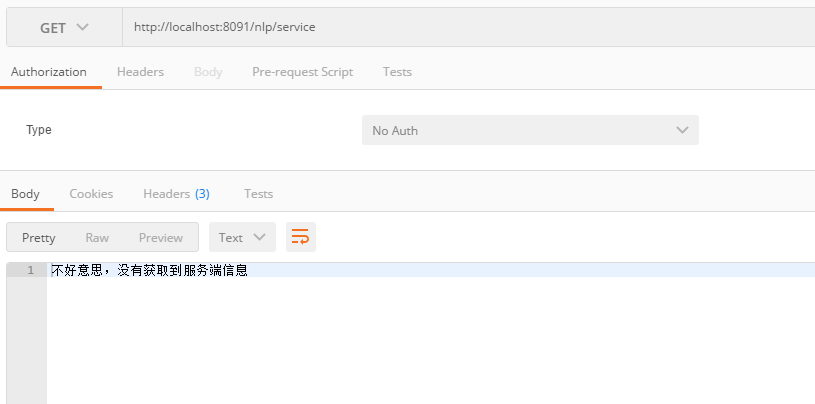
先停止微服务’ralab-nlp’,重新运行RalabClientApplication,测试http://localhost:8091/nlp/service

上面利用Hystrix实现了微服务’ralab-client’的容错及故障恢复功能,在其需要容错的方法上,还可以自定义相关参数,这里不再演示

建立注册服务器(ralab-server)并服务提供者(ralab-nlp)向其注册后,这时服务消费者(ralab-client,服务消费者也向注册服务器注册)可以通过访问注册服务器,查找服务实例名的方式查找服务提供者的相关信息,然后调用其服务

这里基于微服务’ralab-client’

  • Add @LoadBalanced to the RestTemplate Instance
  • Edit RestTemplate url parameter host as ‘nlp-service’

服务消费者ralab-client
RalabClientApplication文件

1
2
3
4
5
6
7
8
9
10
11
12
13
14
15
16
17
18
19
20
21
22
23
24
25
package com.ralab.ralabclient;

import org.springframework.boot.SpringApplication;
import org.springframework.boot.autoconfigure.SpringBootApplication;
import org.springframework.cloud.client.loadbalancer.LoadBalanced;
import org.springframework.cloud.netflix.eureka.EnableEurekaClient;
import org.springframework.context.annotation.Bean;
import org.springframework.web.client.RestTemplate;

@SpringBootApplication
@EnableEurekaClient
public class RalabClientApplication {

@Bean
@LoadBalanced
public RestTemplate getRestTemplate()
{
return new RestTemplate();
}

public static void main(String[] args) {
SpringApplication.run(RalabClientApplication.class, args);
}

}

修改NlpResource文件

1
2
3
4
5
6
7
8
9
10
11
12
13
14
15
16
17
18
19
20
21
22
23
package com.ralab.ralabclient.resources;

import org.springframework.beans.factory.annotation.Autowired;
import org.springframework.web.bind.annotation.GetMapping;
import org.springframework.web.bind.annotation.RequestMapping;
import org.springframework.web.bind.annotation.RestController;
import org.springframework.web.client.RestTemplate;

@RestController
@RequestMapping("/nlp")
public class NlpResource {

@Autowired
private RestTemplate restTemplate;

@GetMapping("/service")
public String index()
{
//String result = restTemplate.getForObject("http://localhost:8090/nlp/api", String.class);
String result = restTemplate.getForObject("http://nlp-service/nlp/api", String.class);
return result;
}
}

运行RalabClientApplication

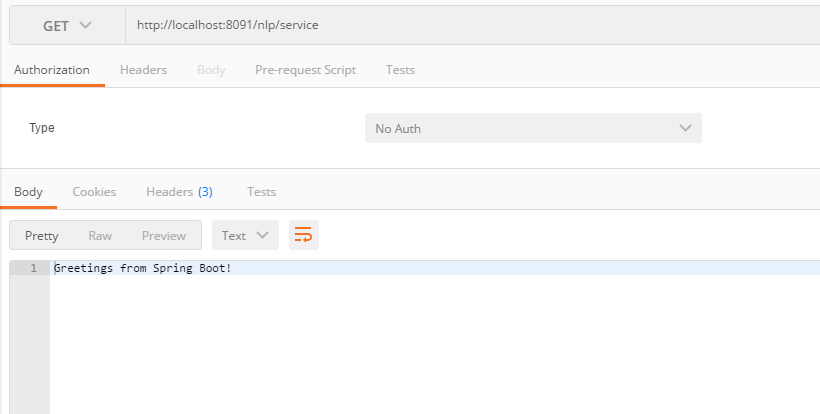
测试http://localhost:8091/nlp/service

这里基于微服务’ralab-nlp’和’ralab-client’

  • Add the Maven spring-cloud-starter-netflix-eureka-client denpendency
  • Add @EnableEurekaClient to the application class
  • Add spring.application.name parameter to the application.properties file

这时修改服务提供者ralab-nlp的pom.xml文件,引入eureka-client依赖

1
2
3
4
5
6
7
8
9
10
11
12
13
14
15
16
17
18
19
20
21
22
23
24
25
26
27
28
29
30
31
32
33
34
35
36
37
38
39
40
41
42
43
44
45
46
47
48
49
50
51
52
53
54
55
56
57
58
59
60
<?xml version="1.0" encoding="UTF-8"?>
<project xmlns="http://maven.apache.org/POM/4.0.0" xmlns:xsi="http://www.w3.org/2001/XMLSchema-instance"
xsi:schemaLocation="http://maven.apache.org/POM/4.0.0 https://maven.apache.org/xsd/maven-4.0.0.xsd">
<modelVersion>4.0.0</modelVersion>
<parent>
<groupId>org.springframework.boot</groupId>
<artifactId>spring-boot-starter-parent</artifactId>
<version>2.1.8.RELEASE</version>
<relativePath/> <!-- lookup parent from repository -->
</parent>
<groupId>com.ralab</groupId>
<artifactId>ralab-nlp</artifactId>
<version>0.0.1-SNAPSHOT</version>
<name>ralab-nlp</name>
<description>Demo project for Spring Boot</description>

<properties>
<java.version>1.8</java.version>
<spring-cloud.version>Greenwich.SR2</spring-cloud.version>
</properties>

<dependencies>
<dependency>
<groupId>org.springframework.boot</groupId>
<artifactId>spring-boot-starter-web</artifactId>
</dependency>
<dependency>
<groupId>org.springframework.cloud</groupId>
<artifactId>spring-cloud-starter-netflix-eureka-client</artifactId>
</dependency>

<dependency>
<groupId>org.springframework.boot</groupId>
<artifactId>spring-boot-starter-test</artifactId>
<scope>test</scope>
</dependency>
</dependencies>

<dependencyManagement>
<dependencies>
<dependency>
<groupId>org.springframework.cloud</groupId>
<artifactId>spring-cloud-dependencies</artifactId>
<version>${spring-cloud.version}</version>
<type>pom</type>
<scope>import</scope>
</dependency>
</dependencies>
</dependencyManagement>

<build>
<plugins>
<plugin>
<groupId>org.springframework.boot</groupId>
<artifactId>spring-boot-maven-plugin</artifactId>
</plugin>
</plugins>
</build>

</project>

修改RalabNlpApplication文件

1
2
3
4
5
6
7
8
9
10
11
12
13
14
15
16
17
18
package com.ralab.ralabnlp;

import org.springframework.boot.SpringApplication;
import org.springframework.boot.autoconfigure.SpringBootApplication;
import org.springframework.cloud.netflix.eureka.EnableEurekaClient;
import org.springframework.context.annotation.ComponentScan;

//(scanBasePackages = { "com.ralab.nlp.controller"})
//@ComponentScan({"com.ralab.nlp.controller"})
@SpringBootApplication
@EnableEurekaClient
public class RalabNlpApplication {

public static void main(String[] args) {
SpringApplication.run(RalabNlpApplication.class, args);
}

}

修改application.properties文件
spring.application.name=nlp-service
server.port=8090

运行RalabNlpApplication

同时修改服务消费者ralab-client的pom.xml文件,引入eureka-client依赖

1
2
3
4
5
6
7
8
9
10
11
12
13
14
15
16
17
18
19
20
21
22
23
24
25
26
27
28
29
30
31
32
33
34
35
36
37
38
39
40
41
42
43
44
45
46
47
48
49
50
51
52
53
54
55
56
57
58
59
60
<?xml version="1.0" encoding="UTF-8"?>
<project xmlns="http://maven.apache.org/POM/4.0.0" xmlns:xsi="http://www.w3.org/2001/XMLSchema-instance"
xsi:schemaLocation="http://maven.apache.org/POM/4.0.0 https://maven.apache.org/xsd/maven-4.0.0.xsd">
<modelVersion>4.0.0</modelVersion>
<parent>
<groupId>org.springframework.boot</groupId>
<artifactId>spring-boot-starter-parent</artifactId>
<version>2.1.8.RELEASE</version>
<relativePath/> <!-- lookup parent from repository -->
</parent>
<groupId>com.ralab</groupId>
<artifactId>ralab-client</artifactId>
<version>0.0.1-SNAPSHOT</version>
<name>ralab-client</name>
<description>Demo project for Spring Boot</description>

<properties>
<java.version>1.8</java.version>
<spring-cloud.version>Greenwich.SR2</spring-cloud.version>
</properties>

<dependencies>
<dependency>
<groupId>org.springframework.boot</groupId>
<artifactId>spring-boot-starter-web</artifactId>
</dependency>
<dependency>
<groupId>org.springframework.cloud</groupId>
<artifactId>spring-cloud-starter-netflix-eureka-client</artifactId>
</dependency>

<dependency>
<groupId>org.springframework.boot</groupId>
<artifactId>spring-boot-starter-test</artifactId>
<scope>test</scope>
</dependency>
</dependencies>

<dependencyManagement>
<dependencies>
<dependency>
<groupId>org.springframework.cloud</groupId>
<artifactId>spring-cloud-dependencies</artifactId>
<version>${spring-cloud.version}</version>
<type>pom</type>
<scope>import</scope>
</dependency>
</dependencies>
</dependencyManagement>

<build>
<plugins>
<plugin>
<groupId>org.springframework.boot</groupId>
<artifactId>spring-boot-maven-plugin</artifactId>
</plugin>
</plugins>
</build>

</project>

修改RalabClientApplication文件

1
2
3
4
5
6
7
8
9
10
11
12
13
14
15
16
17
18
19
20
21
22
23
package com.ralab.ralabclient;

import org.springframework.boot.SpringApplication;
import org.springframework.boot.autoconfigure.SpringBootApplication;
import org.springframework.cloud.netflix.eureka.EnableEurekaClient;
import org.springframework.context.annotation.Bean;
import org.springframework.web.client.RestTemplate;

@SpringBootApplication
@EnableEurekaClient
public class RalabClientApplication {

@Bean
public RestTemplate getRestTemplate()
{
return new RestTemplate();
}

public static void main(String[] args) {
SpringApplication.run(RalabClientApplication.class, args);
}

}

修改application.properties文件
spring.application.name=nlp-client
server.port=8091

运行RalabClientApplication

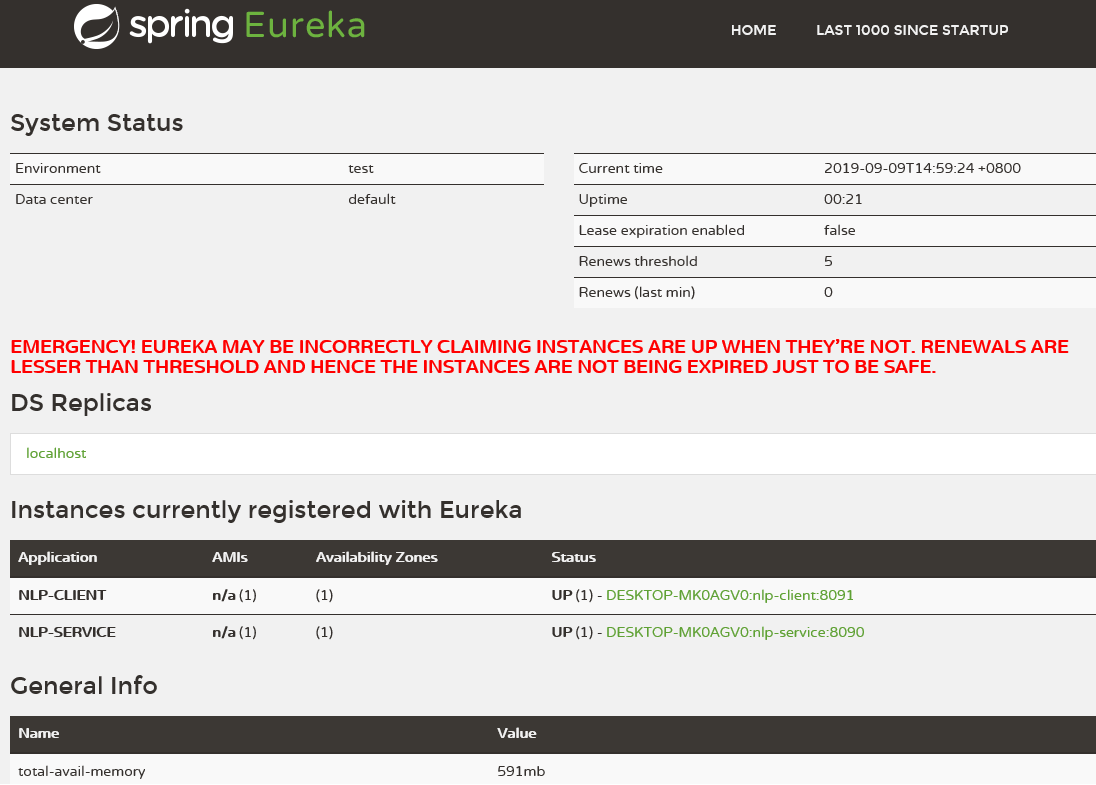
这时在浏览器打开http://localhost:8761/

可以看到注册实例nlp-service和nlp-client

前两文中的建立的项目,在逻辑上可分为服务提供者(ralab-nlp)和服务消费者(ralab-client),服务消费者采用RestTemplate与之通信
在spring cloude中,采用了服务注册的方式,所有的服务提供者及服务消费者都向注册服务器注册,然后服务消费者从注册服务器上查询相关服务

微服务’ralab-server’

  • New microservice ‘ralab-server’ and add the Maven spring-cloud-starter-netflix-eureka-server denpendency
  • Add @EnableEurekaServer to the application class

本文建立注册服务器(注册服务器ralab-server),引入eureka-server依赖,pom.xml文件如下:

1
2
3
4
5
6
7
8
9
10
11
12
13
14
15
16
17
18
19
20
21
22
23
24
25
26
27
28
29
30
31
32
33
34
35
36
37
38
39
40
41
42
43
44
45
46
47
48
49
50
51
52
53
54
55
56
<?xml version="1.0" encoding="UTF-8"?>
<project xmlns="http://maven.apache.org/POM/4.0.0" xmlns:xsi="http://www.w3.org/2001/XMLSchema-instance"
xsi:schemaLocation="http://maven.apache.org/POM/4.0.0 https://maven.apache.org/xsd/maven-4.0.0.xsd">
<modelVersion>4.0.0</modelVersion>
<parent>
<groupId>org.springframework.boot</groupId>
<artifactId>spring-boot-starter-parent</artifactId>
<version>2.1.8.RELEASE</version>
<relativePath/> <!-- lookup parent from repository -->
</parent>
<groupId>com.ralab</groupId>
<artifactId>ralab-server</artifactId>
<version>0.0.1-SNAPSHOT</version>
<name>ralab-server</name>
<description>Demo project for Spring Boot</description>

<properties>
<java.version>1.8</java.version>
<spring-cloud.version>Greenwich.SR2</spring-cloud.version>
</properties>

<dependencies>
<dependency>
<groupId>org.springframework.cloud</groupId>
<artifactId>spring-cloud-starter-netflix-eureka-server</artifactId>
</dependency>

<dependency>
<groupId>org.springframework.boot</groupId>
<artifactId>spring-boot-starter-test</artifactId>
<scope>test</scope>
</dependency>
</dependencies>

<dependencyManagement>
<dependencies>
<dependency>
<groupId>org.springframework.cloud</groupId>
<artifactId>spring-cloud-dependencies</artifactId>
<version>${spring-cloud.version}</version>
<type>pom</type>
<scope>import</scope>
</dependency>
</dependencies>
</dependencyManagement>

<build>
<plugins>
<plugin>
<groupId>org.springframework.boot</groupId>
<artifactId>spring-boot-maven-plugin</artifactId>
</plugin>
</plugins>
</build>

</project>

RalabServerApplication文件

1
2
3
4
5
6
7
8
9
10
11
12
13
14
15
package com.ralab.ralabserver;

import org.springframework.boot.SpringApplication;
import org.springframework.boot.autoconfigure.SpringBootApplication;
import org.springframework.cloud.netflix.eureka.server.EnableEurekaServer;

@SpringBootApplication
@EnableEurekaServer
public class RalabServerApplication {

public static void main(String[] args) {
SpringApplication.run(RalabServerApplication.class, args);
}

}

运行RalabServerApplication

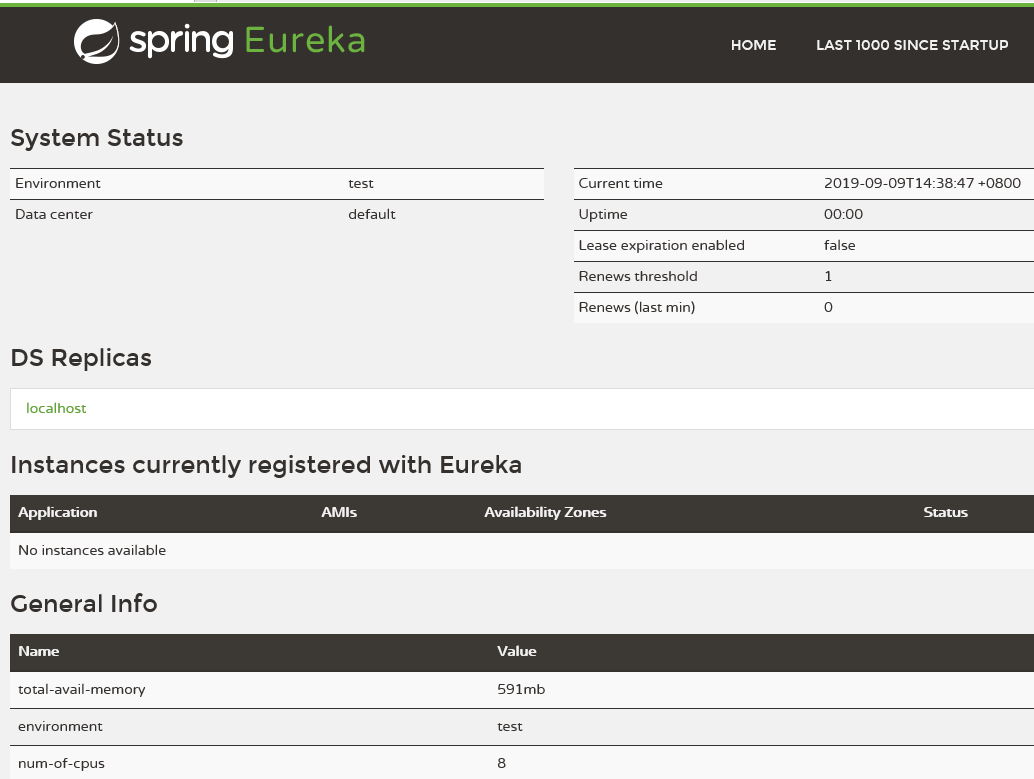
打开浏览器http://localhost:8761/

这时没有发现注册实例

上文采用spring boot建立了restful项目,本文建立新的项目,并处理与之通信
先设置上文应用程序的端口,resources文件夹application.properties
server.port=8090

微服务’ralab-client’

  • New mocroservice ‘ralab-client’ and add the Maven spring-boot-starter-web denpendency
  • Add server.port parameter to the application.properties file
  • Add RestTemplate instance to Communicate with mocroservice ‘ralab-nlp’ by url

新建maven项目(服务消费者ralab-client),引入spring-web依赖,pom.xml文件如下:

1
2
3
4
5
6
7
8
9
10
11
12
13
14
15
16
17
18
19
20
21
22
23
24
25
26
27
28
29
30
31
32
33
34
35
36
37
38
39
40
41
42
43
<?xml version="1.0" encoding="UTF-8"?>
<project xmlns="http://maven.apache.org/POM/4.0.0" xmlns:xsi="http://www.w3.org/2001/XMLSchema-instance"
xsi:schemaLocation="http://maven.apache.org/POM/4.0.0 https://maven.apache.org/xsd/maven-4.0.0.xsd">
<modelVersion>4.0.0</modelVersion>
<parent>
<groupId>org.springframework.boot</groupId>
<artifactId>spring-boot-starter-parent</artifactId>
<version>2.1.8.RELEASE</version>
<relativePath/> <!-- lookup parent from repository -->
</parent>
<groupId>com.ralab</groupId>
<artifactId>ralab-client</artifactId>
<version>0.0.1-SNAPSHOT</version>
<name>ralab-client</name>
<description>Demo project for Spring Boot</description>

<properties>
<java.version>1.8</java.version>
</properties>

<dependencies>
<dependency>
<groupId>org.springframework.boot</groupId>
<artifactId>spring-boot-starter-web</artifactId>
</dependency>

<dependency>
<groupId>org.springframework.boot</groupId>
<artifactId>spring-boot-starter-test</artifactId>
<scope>test</scope>
</dependency>
</dependencies>

<build>
<plugins>
<plugin>
<groupId>org.springframework.boot</groupId>
<artifactId>spring-boot-maven-plugin</artifactId>
</plugin>
</plugins>
</build>

</project>

RalabClientApplication文件

1
2
3
4
5
6
7
8
9
10
11
12
13
14
15
16
17
18
19
20
21
package com.ralab.ralabclient;

import org.springframework.boot.SpringApplication;
import org.springframework.boot.autoconfigure.SpringBootApplication;
import org.springframework.context.annotation.Bean;
import org.springframework.web.client.RestTemplate;

@SpringBootApplication
public class RalabClientApplication {

@Bean
public RestTemplate getRestTemplate()
{
return new RestTemplate();
}

public static void main(String[] args) {
SpringApplication.run(RalabClientApplication.class, args);
}

}

新建NlpResource

1
2
3
4
5
6
7
8
9
10
11
12
13
14
15
16
17
18
19
20
21
22
package com.ralab.ralabclient.resources;

import org.springframework.beans.factory.annotation.Autowired;
import org.springframework.web.bind.annotation.GetMapping;
import org.springframework.web.bind.annotation.RequestMapping;
import org.springframework.web.bind.annotation.RestController;
import org.springframework.web.client.RestTemplate;

@RestController
@RequestMapping("/nlp")
public class NlpResource {

@Autowired
private RestTemplate restTemplate;

@GetMapping("/service")
public String index()
{
String result = restTemplate.getForObject("http://localhost:8090/nlp/api", String.class);
return result;
}
}

设置端口
resources文件夹application.properties
server.port=8091

运行RalabClientApplication

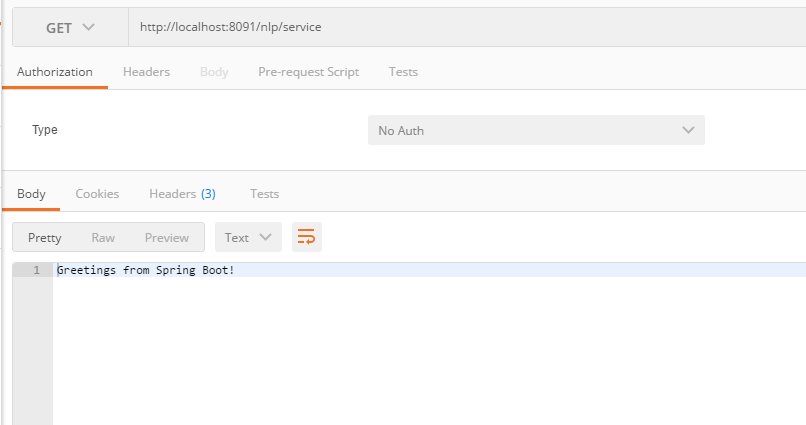
测试http://localhost:8091/nlp/service

微服务’ralab-nlp’

  • New mocroservice ‘ralab-nlp’ and add the Maven spring-boot-starter-web denpendency
  • Add @SpringBootApplication to the application class
  • Add HelloController

本文采用maven建立应用程序(服务提供者ralab-nlp),引入spring-web依赖,pom.xml配置如下

1
2
3
4
5
6
7
8
9
10
11
12
13
14
15
16
17
18
19
20
21
22
23
24
25
26
27
28
29
30
31
32
33
34
35
36
37
38
39
40
41
42
43
<?xml version="1.0" encoding="UTF-8"?>
<project xmlns="http://maven.apache.org/POM/4.0.0" xmlns:xsi="http://www.w3.org/2001/XMLSchema-instance"
xsi:schemaLocation="http://maven.apache.org/POM/4.0.0 https://maven.apache.org/xsd/maven-4.0.0.xsd">
<modelVersion>4.0.0</modelVersion>
<parent>
<groupId>org.springframework.boot</groupId>
<artifactId>spring-boot-starter-parent</artifactId>
<version>2.1.8.RELEASE</version>
<relativePath/> <!-- lookup parent from repository -->
</parent>
<groupId>com.ralab</groupId>
<artifactId>ralab-nlp</artifactId>
<version>0.0.1-SNAPSHOT</version>
<name>ralab-nlp</name>
<description>Demo project for Spring Boot</description>

<properties>
<java.version>1.8</java.version>
</properties>

<dependencies>
<dependency>
<groupId>org.springframework.boot</groupId>
<artifactId>spring-boot-starter-web</artifactId>
</dependency>

<dependency>
<groupId>org.springframework.boot</groupId>
<artifactId>spring-boot-starter-test</artifactId>
<scope>test</scope>
</dependency>
</dependencies>

<build>
<plugins>
<plugin>
<groupId>org.springframework.boot</groupId>
<artifactId>spring-boot-maven-plugin</artifactId>
</plugin>
</plugins>
</build>

</project>

自动生成RalabNlpApplication.java代码

1
2
3
4
5
6
7
8
9
10
11
12
13
14
15
16
package com.ralab.ralabnlp;

import org.springframework.boot.SpringApplication;
import org.springframework.boot.autoconfigure.SpringBootApplication;
import org.springframework.context.annotation.ComponentScan;

//(scanBasePackages = { "com.ralab.nlp.controller"})
@SpringBootApplication
@ComponentScan({"com.ralab.nlp.controller"})
public class RalabNlpApplication {

public static void main(String[] args) {
SpringApplication.run(RalabNlpApplication.class, args);
}

}

新建HelloController.java

1
2
3
4
5
6
7
8
9
10
11
12
13
14
15
16
17
18
package com.ralab.nlp.controller;


//import org.springframework.web.bind.annotation.RequestMapping;

import org.springframework.web.bind.annotation.GetMapping;
import org.springframework.web.bind.annotation.RequestMapping;
import org.springframework.web.bind.annotation.RestController;

@RestController
@RequestMapping("/nlp")
public class HelloController {

@GetMapping("/api")
public String index() {
return "Greetings from Spring Boot!";
}
}

运行RalabNlpApplication

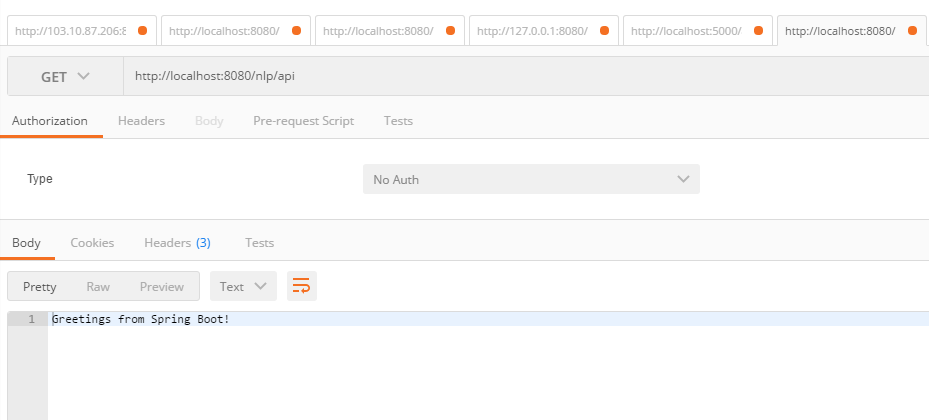
测试http://localhost:8080/nlp/api